Example
Introduction #
This solo project is a standalone skill tree creator written in C++ designed to allow users to visually create and export functional skill trees for use in their own game engines.
Over the course of 4 weeks, the goal was to create a flexible tool that separates the design user from the implementation user, allowing developers to define their own layout, connections and progression logic without having to hardcode systems in their game.
The creator exports structured .json data alongside used sprite assets, allowing developers to take the exported data and implement it whatever way works best for their engine.
Inspiration #
I was heavily inspired by Path of Building. It demonstrates how complex and expressive skill trees can be and I wanted to achieve a similar tool while keeping it lightweight, modular and adaptable for different use cases.
The problem #
Designing skill trees quickly becomes difficult and frustrating to manage as complexity increases. Layout, node relationships and progression rules are often entwined with engine logic, making iteration work slow.
Existing tools, such as the main inspiration of this project, are often tailored to specific games or do not provide full customization of the tree.
Because of this, my goal was to:
- Provide a visual editing tool for rapid iteration, making as much as possible customizable
- Output only the essential runtime data
- Allow developers full control over implementation
Solution #
The application is a stripped-down version of the custom engine we used for game projects at TGA, only having the means to render sprites, recieve inputs and includes the DearImGui library for rapid UI development as well as the nlohmann/json library for serialization.
The tool allows users to:
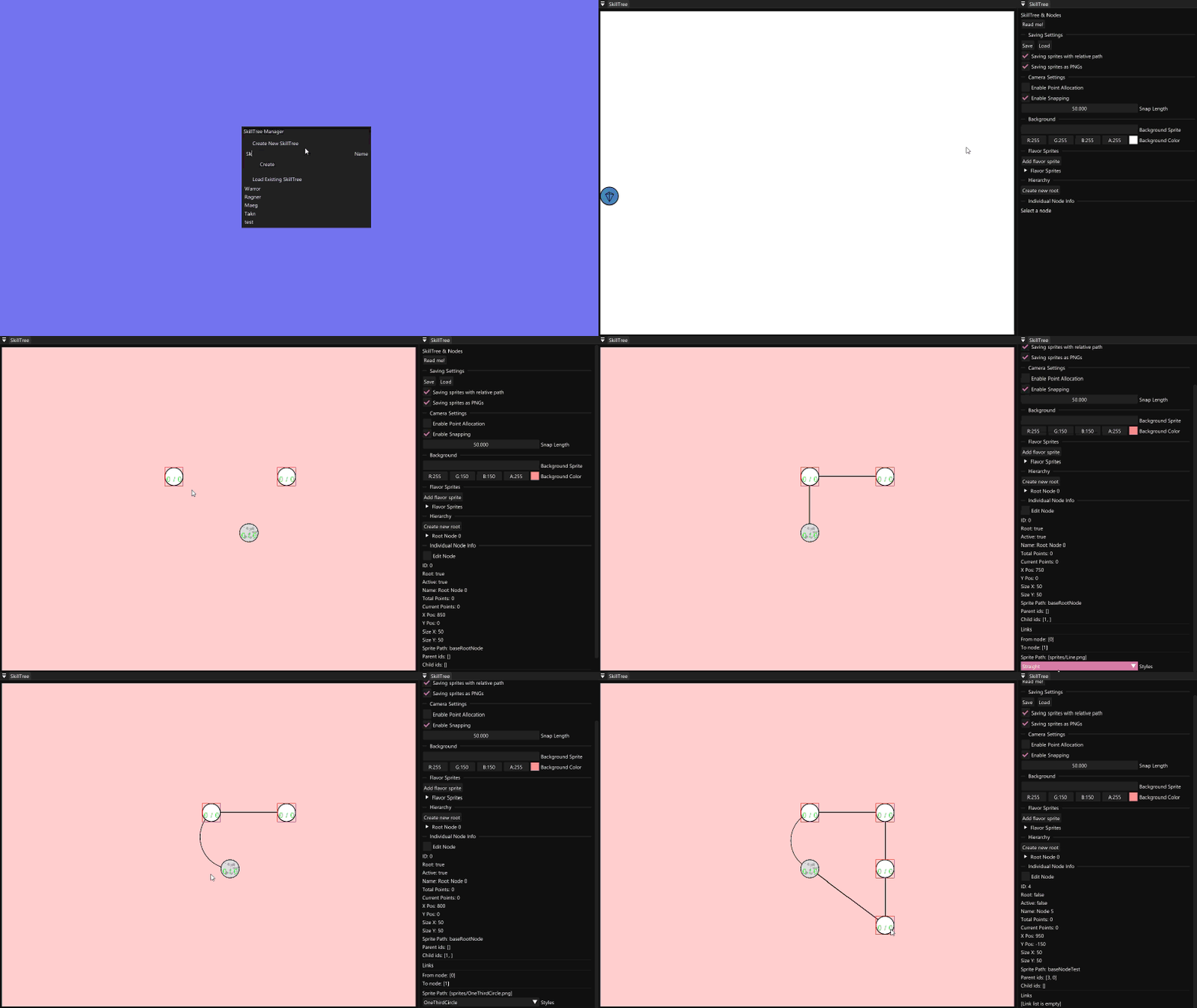
- Create and position nodes visually
- Define relationships between nodes
- Assign stats and sprites
- Export all relevant data for runtime use
One of my main focuses was balancing flexibility and usability, since giving users access to edit all data/behavior quickly leads to a cluttered interface making the tool frustrating to use. This tradeoff influenced several design decisions throughout development.
Design and Structure #
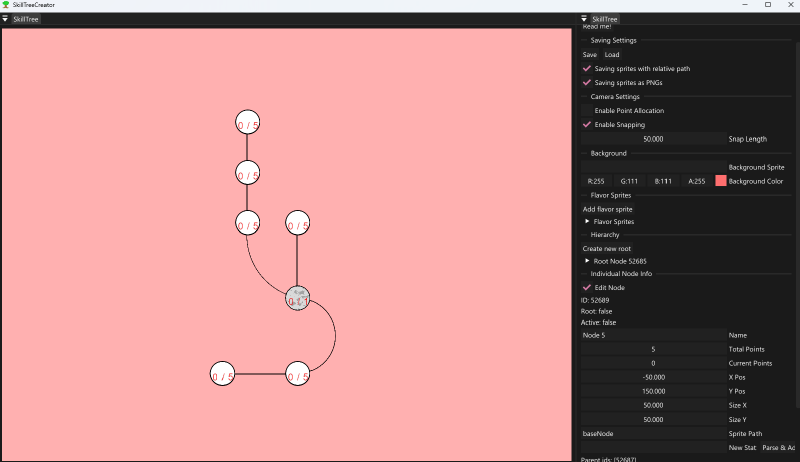
As for the design of the tool, I chose the classic “Game Editor” layout because it provides a large view of the nodes and data being shown in a easy to read top-bottom manner. And since users will be developers, I give them a familiar look.
Viewport #
The viewport is implemented using a dynamically sized render target that is embedded inside an ImGui window, allowing the skill tree to be rendered independently while still behaving like a native UI element.
This approach makes it possible to:
- Handle rendering separately from UI logic
- Support resizing without recreating the system
- Maintains a clear separation between editor and runtime behavior
// Upon construction of the actual Skill Tree Class I set up the string references for each window
myDocumentWindowClass = std::make_unique<ImGuiWindowClass>();

char buffer[512];
sprintf_s(buffer, "SkillTree##ViewportPreview");
myPanelWindowNames[static_cast<size_t>(Panels::Viewport)] = buffer;
sprintf_s(buffer, "SkillTree##Settings");
myPanelWindowNames[static_cast<size_t>(Panels::Nodes)] = buffer;
// Using the string reference
void SkillTree::RenderViewportPanel()
{
ImGui::Begin(myPanelWindowNames[static_cast<size_t>(Panels::Viewport)].c_str());
const ImVec2 viewportSize{ ImGui::GetContentRegionAvail() };
if (viewportSize.x > 0 && viewportSize.y > 0 && (myViewportSize.x != static_cast<uint32_t>(viewportSize.x) || myViewportSize.y != static_cast<uint32_t>(viewportSize.y)))
{
myViewportSize = { static_cast<uint32_t>(viewportSize.x), static_cast<uint32_t>(viewportSize.y)};
// Default constructing the render target in order to release GPU resources.
myRenderTarget = {};
myRenderTarget = RatTrap::RenderTarget::Create(myViewportSize, DXGI_FORMAT_R8G8B8A8_TYPELESS, DXGI_FORMAT_R8G8B8A8_UNORM_SRGB, DXGI_FORMAT_R8G8B8A8_UNORM);
}
ImGui::Image(reinterpret_cast<ImTextureID>(myRenderTarget.GetShaderResourceView()), viewportSize);
ImGui::End();
}Which lets the Handler set the trees render target as active, making subsequent rendering appear in the given viewport.
// Render() function in SkillTreeHandler.cpp
myActiveSkillTree->GetRenderTarget()->Clear(myActiveSkillTree->GetBackgroundColor());
myActiveSkillTree->GetRenderTarget()->SetAsActiveTarget();
// Render nodes, sprites, links...
Unified item system #
Initially, nodes and decorative elements (I call them “flavor sprites”) were implemented as separate systems. While this made the structure clearer at first, it quickly became limiting as new features were introduced.
Notable example is the implementation of Copy/Paste, which required handling both types in similar ways, leading to duplicated logic.
To adress this, both were refactored to inherit from a shared base struct where:
- Common properties are centralized (Position, size, sprite)
- Shared functionality can be reused
- New features can be implemented and applied universally This simplified the overall system.
"Skill Tree Item" data
struct SkillTreeItem
{
    float x;
    float y;
    float sizeX;
    float sizeY;
    float angle;

    float color[4]{ 1.f, 1.f, 1.f, 1.f };

    std::string sprite;

    [[nodiscard]] virtual float GetXPos() const { return x; }
    [[nodiscard]] virtual float GetYPos() const { return y; }
    [[nodiscard]] virtual float GetAngle() const { return angle; }

    virtual void SetPosition(const float aX, const float aY) { x = aX; y = aY; }
};
Since flavor sprites are just that, for flavor, no additional data is needed for them aside from what the base class provides.
struct TreeFlavorSprite : SkillTreeItem {};Tree structure #
The skill tree class is built around a node-based structure using lightweight IDs to represent relationships. Acting as a wrapper for the nodes, it provides helper functions and handles serialization
Class header
class SkillTree
{
public:
    enum class Panels
    {
        Viewport,
        Nodes,
        Count,
    };
    SkillTree();

    void Init(const std::string& aName);

    void Update(float aMouseX, float aMouseY, bool aMouseInView);
    bool EditorUpdate(float aMouseX, float aMouseY, bool aMouseInView);

    void CopyCurrentItem();
    void PasteCopiedItem();

    // Gives id on creation.
    SkillTreeNode* CreateRootNode(float aXPos, float aYPos);
    SkillTreeNode* CreateNode(float aXPos, float aYPos);

    void DeleteNode(NodeId aNodeId);
    bool DeleteSprite(const SkillTreeItem* aSprite);

    // For manual linking
    bool LinkNodes(NodeId aParentId, NodeId aChildId);
    void UnlinkNodes(NodeId aParentId, NodeId aChildId);

    std::vector<SkillTreeNode>& GetNodes() { return myNodes; }

    void Save();
    void Load();

    RatTrap::Vector4f GetBackgroundColor() const { return RatTrap::Vector4f(mySkillTreeData.backgroundColor[0], mySkillTreeData.backgroundColor[1], mySkillTreeData.backgroundColor[2], mySkillTreeData.backgroundColor[3]); }
    RatTrap::Vector2ui GetViewportSize() const { return myViewportSize; }
    RatTrap::RenderTarget* GetRenderTarget() { return &myRenderTarget; }
    SkillTreeNode* GetNodeById(NodeId aNodeId);
    SkillTreeNode* GetNodeById(uint16_t aRawNodeId);
    SkillTreeNode* GetNodeFromMousePos(float aMouseXPos, float aMouseYPos);
    SkillTreeData* GetTreeData() { return &mySkillTreeData; }

    void WriteToJson(nlohmann::json& aJson) const;
    void LoadFromJson(nlohmann::json& aJson);

private:
    void RenderViewportPanel();
    bool RenderEditingPanel(float aMouseX, float aMouseY, bool aMouseInView);

    bool RecursiveDisplay(const std::vector<NodeId>& someChildren);
    void PerformSave();

    bool myDockingInitialized{ false };
    bool mySnappingMode { true };
    bool myPointAllocationMode{ false };
    bool myEditNodeMode{ false };
    bool myAboutToExit{ false };

    // Saving
    bool mySaveSpritesWithRelativePath{ true };
    bool mySaveAsPng{ true };

    float mySnapLength{ 50.f };

    SkillTreeItem* myLastSelectedItem{ nullptr };
    SkillTreeItem* myCopiedItem{ nullptr };

    SkillTreeData mySkillTreeData;

    std::vector<SkillTreeNode> myNodes;

    std::string myPanelWindowNames[static_cast<size_t>(Panels::Count)];
    std::shared_ptr<ImGuiWindowClass> myDocumentWindowClass;

    RatTrap::Vector2ui myViewportSize;
    RatTrap::RenderTarget myRenderTarget;
};
Nodes #
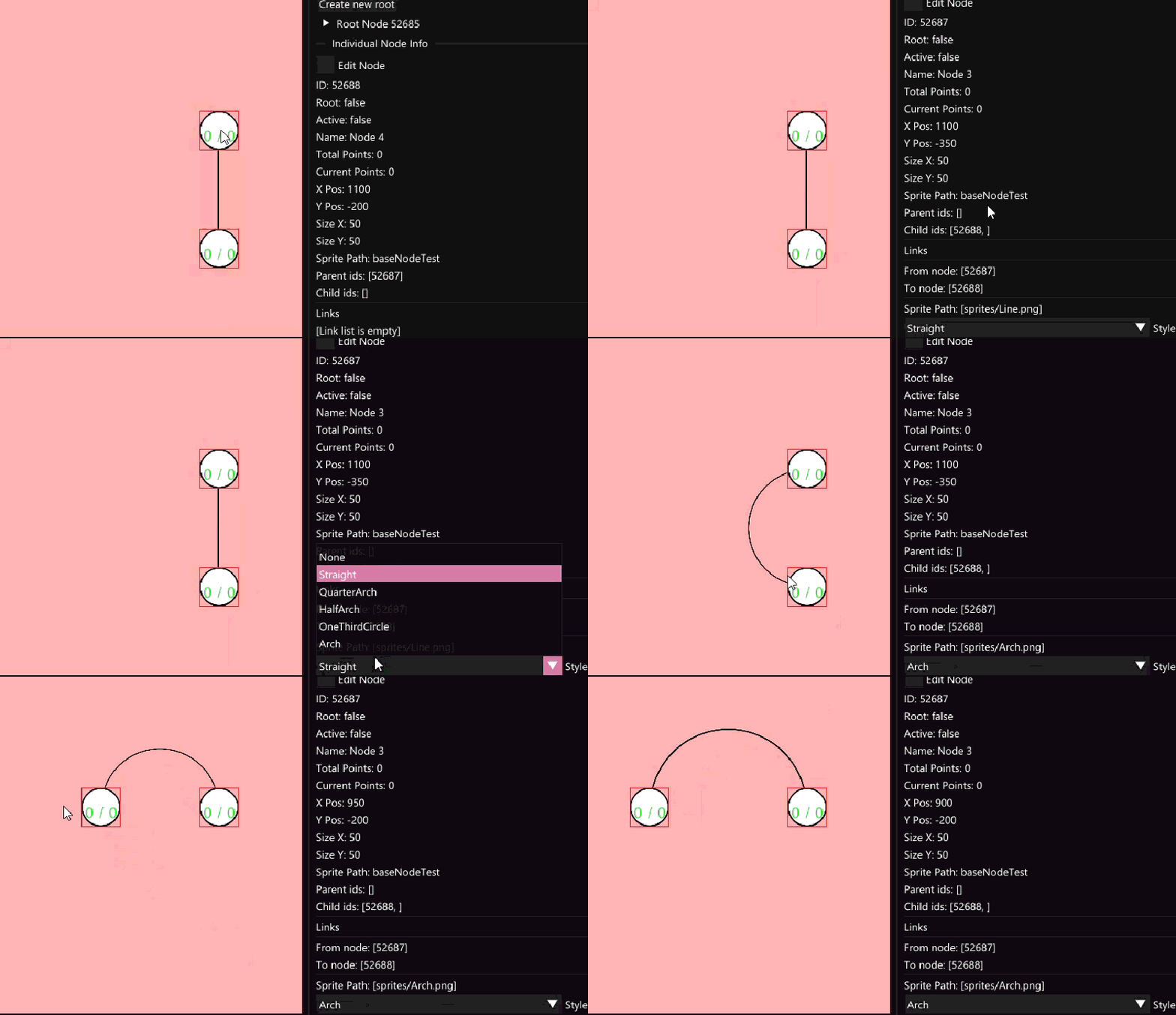
Each node maintains references to parent and child nodes aswell as associated links for visual and logical connections. This approach avoids pointer ownership issues while making serialization straightforward.
I also store link data on child nodes to further simplify traversal and ensure that relationships remain consistent during save/load operations
Node Data
struct NodeId
{
    uint16_t id;

    bool IsValid() { return id != std::numeric_limits<uint16_t>::max(); }

    constexpr bool operator==(const NodeId& aOther) const noexcept
    {
        return id == aOther.id;
    }
    constexpr bool operator!=(const NodeId& aOther) const noexcept
    {
        return id != aOther.id;
    }
};

struct SkillTreeNode : SkillTreeItem
{
    SkillTreeNode() = default;

    SkillTreeNode(SkillTreeNode&&) = default;
    SkillTreeNode& operator=(SkillTreeNode&&) = default;

    SkillTreeNode(const SkillTreeNode&) = delete;
    SkillTreeNode& operator=(const SkillTreeNode&) = delete;

    void DisplayImGui();
    // Dump everything
    void DisplayNodeInfo(bool aEditMode);

    std::vector<std::string> GetEvaluatedStats() const;

    NodeId GetNodeId() const { return id; }

    NodeId id;

    bool root{ false };
    bool active{ false };
    int totalPoints{ 0 };
    int currentPoints{ 0 };

    std::string name;
    std::string sprite;

    std::vector<std::unique_ptr<StatToParse>> stats;

    std::vector<NodeId> parents;
    std::vector<NodeId> children;

    std::vector<SkillTreeLink> links; // Link data only needed on children
};
Data and Serialization #
One of my key goals for the tool was to output only the data necessary for runtime usage.
The system serializes:
- Node positions and properties
- Relationships between nodes
- Visual data
- Gameplay-related values
By exporting this with json, the tool remains separate from any specific engine. Developers are free to interpret and use the data however they choose.
Write To Json
void SkillTree::WriteToJson(nlohmann::json& aJson) const
{
    using namespace nlohmann;

    aJson["nodes"] = json::array();

    for (const auto& node : myNodes)
    {
        json nodeJson;
        nodeJson["id"] = node.id.id;
        nodeJson["root"] = node.root;
        nodeJson["active"] = node.active;
        nodeJson["totalPoints"] = node.totalPoints;
        nodeJson["currentPoints"] = node.currentPoints;
        nodeJson["x"] = node.x;
        nodeJson["y"] = node.y;
        nodeJson["sizeX"] = node.sizeX;
        nodeJson["sizeY"] = node.sizeY;
        nodeJson["name"] = node.name;
        if (mySaveSpritesWithRelativePath)
        {
            std::string extension = mySaveAsPng ? ".png" : ".jpg";
            nodeJson["spritePath"] = "Sprites/" + node.sprite + extension;
        }
        else
        {
            nodeJson["spritePath"] = node.sprite;
        }

        json statArray = json::array();
        for (const auto& stat : node.stats)
        {
            json statJson;
            statJson["stat"] = stat->GetOriginalString();
            statArray.push_back(statJson);
        }
        nodeJson["stats"] = statArray;

        json parentArray = json::array();
        for (const auto& [id] : node.parents)
        {
            json parentJson;
            parentJson["parentId"] = id;
            parentArray.push_back(parentJson);
        }
        nodeJson["parents"] = parentArray;

        json childArray = json::array();
        for (const auto& [id] : node.children)
        {
            json childJson;
            childJson["childId"] = id;
            childArray.push_back(childJson);
        }
        nodeJson["children"] = childArray;

        json linkArray = json::array();
        for (const auto& link : node.links)
        {
            json linkJson;
            linkJson["style"] = static_cast<uint8_t>(link.style);
            linkJson["startNode"] = link.startNodeId;
            linkJson["endNode"] = link.endNodeId;
            linkJson["x"] = link.x;
            linkJson["y"] = link.y;
            linkJson["sizeX"] = link.sizeX;
            linkJson["sizeY"] = link.sizeY;
            linkJson["angle"] = link.angle;
            linkJson["path"] = link.spritePath;
            linkArray.push_back(linkJson);
        }
        nodeJson["links"] = linkArray;

        aJson["nodes"].push_back(nodeJson);
    }
}
Load From Json
void SkillTree::LoadFromJson(nlohmann::json& aJson)
{
    using namespace nlohmann;
    myNodes.clear();

    if (!aJson.contains("nodes"))
    {
        return;
    }

    for (auto& nodeJson : aJson["nodes"])
    {
        SkillTreeNode& node = myNodes.emplace_back();

        if (nodeJson.contains("id"))
        {
            node.id.id = nodeJson["id"].get<uint16_t>();
        }
        if (nodeJson.contains("root"))
        {
            node.root = nodeJson["root"].get<bool>();
        }
        if (nodeJson.contains("active"))
        {
            node.active = nodeJson["active"].get<bool>();
        }
        if (nodeJson.contains("totalPoints"))
        {
            node.totalPoints = nodeJson["totalPoints"].get<int>();
        }
        if (nodeJson.contains("currentPoints"))
        {
            node.currentPoints = nodeJson["currentPoints"].get<int>();
        }
        if (nodeJson.contains("x"))
        {
            node.x = nodeJson["x"].get<float>();
        }
        if (nodeJson.contains("y"))
        {
            node.y = nodeJson["y"].get<float>();
        }
        if (nodeJson.contains("sizeX"))
        {
            node.sizeX = nodeJson["sizeX"].get<float>();
        }
        if (nodeJson.contains("sizeY"))
        {
            node.sizeY = nodeJson["sizeY"].get<float>();
        }
        if (nodeJson.contains("name"))
        {
            node.name = nodeJson["name"].get<std::string>();
        }
        if (nodeJson.contains("spritePath"))
        {
            node.sprite = nodeJson["spritePath"].get<std::string>();
        }

        if (nodeJson.contains("stats"))
        {
            for (const auto& stat : nodeJson["stats"])
            {
                std::string statOriginalString = stat["stat"].get<std::string>();
                node.stats.push_back(SkillTreeParser::ParseSkill(statOriginalString));
            }
        }

        if (nodeJson.contains("parents"))
        {
            for (const auto& parentId : nodeJson["parents"])
            {
                NodeId parent{};
                parent.id = parentId["parentId"].get<uint16_t>();
                node.parents.push_back(parent);
            }
        }
        if (nodeJson.contains("children"))
        {
            for (const auto& childId : nodeJson["children"])
            {
                NodeId child{};
                child.id = childId["childId"].get<uint16_t>();
                node.children.push_back(child);
            }
        }
        if (nodeJson.contains("links"))
        {
            for (const auto& jsonLink : nodeJson["links"])
            {
                SkillTreeLink link{};
                link.style = static_cast<LinkStyle>(jsonLink["style"].get<uint8_t>());
                link.startNodeId = jsonLink["startNode"].get<uint16_t>();
                link.endNodeId = jsonLink["endNode"].get<uint16_t>();
                link.x = jsonLink["x"].get<float>();
                link.y = jsonLink["y"].get<float>();
                link.sizeX = jsonLink["sizeX"].get<float>();
                link.sizeY = jsonLink["sizeY"].get<float>();
                link.angle = jsonLink["angle"].get<float>();
                link.spritePath = jsonLink["path"].get<std::string>();
                node.links.push_back(link);
            }
        }
    }
}
Parsing #
Implementation #
To integrate the generated data into an engine, a lightweight wrapper would be used to:
- Load the json data
- Reconstruct the node graph
- Handle rendering and interaction
With this, the runtime implementation can remain minimal and focused only on gameplay behavior.
(INSERT WRAPPER FOR OUR OWN ENGINE :D)
Using the tool #
The creator provides instructions for quick-commands as well as guides on how to navigate it.
A typical workflow when using the tool would look like:
- Create nodes and position them.
- Link nodes to define progression path.
- Assign stats and properties.
- Save and export.
- Load data into the engine and render the tree when needed.
This separation allows designers and programmers to iterate independently, significantly speeding up development.
Challenges #
Challenges I faced did not neccessarily include the logic itself, but the structure and tool development. More than anything, I realized that if the tool is not versatile enough or easy to navigate, then the existence of the tool becomes redundant. The target audience is developers, if the tool is not to their liking, they can simply create their own skill tree.
Due to this, I often battled with:
- Balancing the flexibility and usability. Mentioned earlier, I wanted to give users access to edit whatever they liked, which led to a blob-looking interface. I often struggled with what properties were “fine” to limit and where I could apply support for custom integration.
- The evolving structure of the system. Early design decisions had to be revisited and refactored as new features or requirements emerged. This is mostly due to not thinking of these said features during planning.
Reflection #
What worked well:
- The editor workflow feels efficient and familiar
- hm
Areas for improvement:
- hu
- hu
Given more time, the next step would be to further refine the user experience, making editable data more user friendly and less frustrating to use. I also wish to add more features, providing the tool with more support for navigation, creation, overall settings for saving, and more.